Track record display panel
Clicking on the heading of the track records column
on the main display opens up the track record display panel.
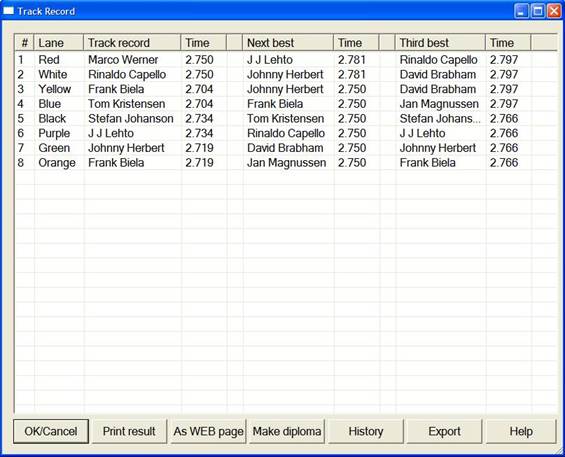
From this panel you can work with the track
records:
 View
3 generations of track records for each lane.
View
3 generations of track records for each lane.
Print
the same info on a printer.
Save
it as a WEB Page to your home page.
Make
Diploma’s to the holder of a track record.
Work
the history file to investigate the circumstances of a track record.
Export
the data
View
this HELP file.
LapMaster
maintains a separate lap record for each lane and for each racing class.
Whenever a
lap record is broken, the LapMaster program announces
so in the loudspeaker system.
The class, lap time, the date and the name of the driver is automatically
stored in the records file.
Track
records are only acknowledged during real racing. (Qualify or some kind of heat
racing), never during practise.
Track
records are recorded, but not announced during the first heat, first stint.
Such announcement would normally lead to information overload.